Bulk edit leads in one action
Filter, tick, set, apply. Syncdo tells you what changed.

- Used by sales teams in India, the UAE, Singapore, Australia and Brazil
- Free plan
- No card needed
- Live the same day
Housekeeping in one go
On the dashboard
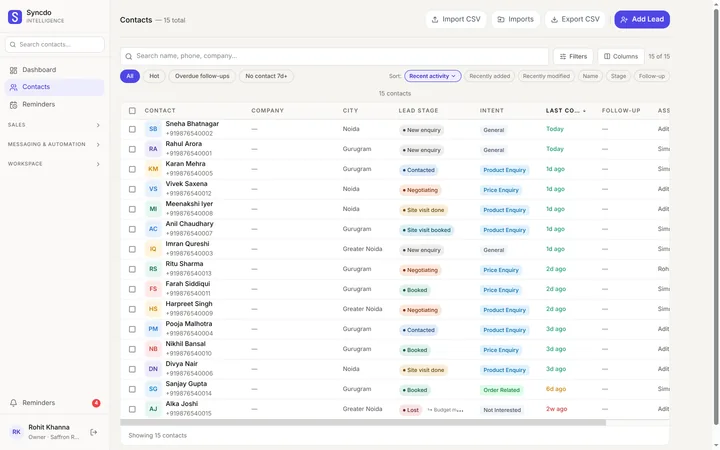
Tick rows in Contacts and pick what to change.
Reassign a list
Hand a whole list to a colleague, or unassign it.
Any field
Stage, deal stage, owner or your own fields.

Reported, never silent
How many updated, how many skipped, and why.
Select. Set. Apply.
Filter the contacts table to the rows you mean, tick them and choose the change. It lands on all of them at once.
- Filter first, then act on exactly what it returned.
- Reassigning needs the permission to reassign leads.
- Skips come with a reason, like "no open deal".

Clean-ups it's made for
- A trade-show batch, moved to a new stage.
- A leaver's leads, handed to a teammate.
- A city or product filled in for a whole import.
Housekeeping is free
Bulk edit is on every plan. Your role decides what you can change, not your plan.

Questions, answered
What is bulk editing in a CRM?
It changes the same field on many leads at once. In Syncdo you filter the contacts table, tick the rows and apply one change.
Which fields can I change in bulk?
Lead stage, deal stage, who it's assigned to, and your own lead fields, including company, email, city and state.
Does bulk edit message my contacts?
No. It only changes your own records.
What if some rows can't be updated?
Syncdo tells you how many were updated and how many skipped, with the reason. It never claims a clean success it didn't have.
Does a reassigned lead keep its history?
Yes. Messages, notes and activity stay with the lead, and an open deal moves with it.
Can I hand over a leaver's leads?
Yes. Removing someone asks who takes over their leads; open deals and reminders move too.
Who can bulk edit?
Anyone whose role allows the change. Reps can't reassign leads by default; Settings, then Permissions, decides.
Can I delete leads in bulk?
Owners and admins with that permission can. The confirmation says how many will go, and it can't be undone.
Which plan do I need?
None: bulk edit is on every plan. Reassigning leads needs the permission to reassign them.
Change two hundred leads in one go.
Free plan · No card needed · Live the same day