Lead integrations for your forms, sheets and ads
Every new lead lands in Syncdo by itself, shared the way you decide.

Works with the tools that bring you leads
Ad platforms
Website forms
Automation tools
Product names are trademarks of their owners. Syncdo works with these products; it is not affiliated with, endorsed by or sponsored by any of them.
The same choices for every source
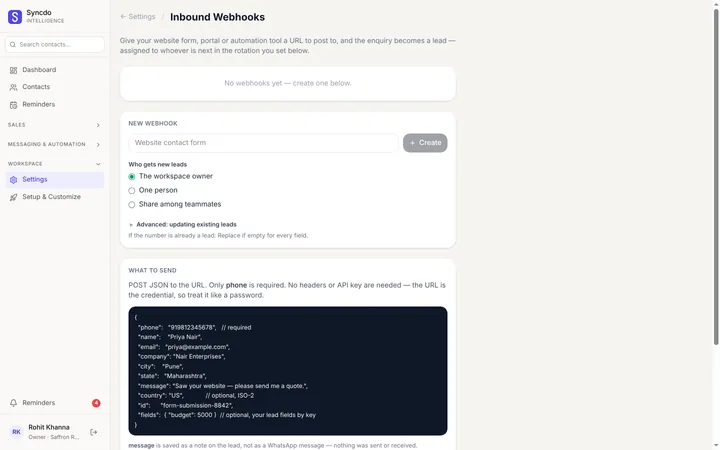
A website form, a Google Sheet and a CSV import ask the same questions, in the same words.
- Who gets new leads: you, one person, or a share.
- A share splits evenly, or by percentages you set.
- Only active teammates get leads.
- Already a lead? Fill empty fields only, or overwrite.

Connect a Google Sheet
- 01
Connect Google once for the whole workspace.
- 02
Pick the sheet and tab, and match the columns.
- 03
Choose who gets the leads. New rows arrive on their own.
What happens when a lead arrives
A repeat number
Updates the lead it matches, never a second copy.
The enquiry
Saved as a note on the lead.
The source
Named after the form or sheet, for Reports.
A problem
Shown on the source with its reason, never skipped silently.
Change it later
- Edit applies to leads that arrive from now on.
- Pause stops a source; the leads it brought stay.
- Remove forgets its settings; the leads stay too.
- Each source shows its health: last lead, and who set it up.
Three ways in, side by side
Questions, answered
What is a CRM integration?
It brings leads into the CRM from where they start, without retyping. Syncdo takes them from website forms, Google Sheets, automation tools and CSV files.
What happens to rows already in my sheet?
You choose when you connect it: start from new rows, or import the earlier rows once too.
Can I change the column matching later?
Yes, with Edit. Changes apply to rows added from then on; rows already read stay as they are.
What if a number is already a lead?
It updates that lead instead of making a second one. Per field, you choose: fill only if empty, or overwrite.
Do I need Zapier?
Not for a form that can send to a web address, or for a Google Sheet. Zapier, Make and Pabbly help with apps that can't.
Do Facebook and Instagram lead ads work?
Yes, through Meta's own Google Sheets connection, or an automation tool that sends each lead to Syncdo.
Which plan do I need?
Google Sheets and the Syncdo API are on Essentials and Intelligence.
Every lead in one place, wherever it starts.
Free plan · No card needed · Live the same day