Follow-up reminders that ring on your phone
Set it beside the chat or after the call. It comes back on time.


- Used by sales teams in India, the UAE, Singapore, Australia and Brazil
- Free plan
- No card needed
- Live the same day
Set it anywhere, get it on time
Beside the chat
Set a reminder on the lead in WhatsApp Web.

After a call
"Call back later" asks when, and sets the reminder.

On Android
It rings as an alarm, even offline.
In the browser
Install the dashboard for push notifications, iPhone too.

Your own types
Site visit, demo, payment follow-up: in your words.
Pushed at once
A reminder set on the computer reaches your phone at once.
Due now, with the lead one tap away
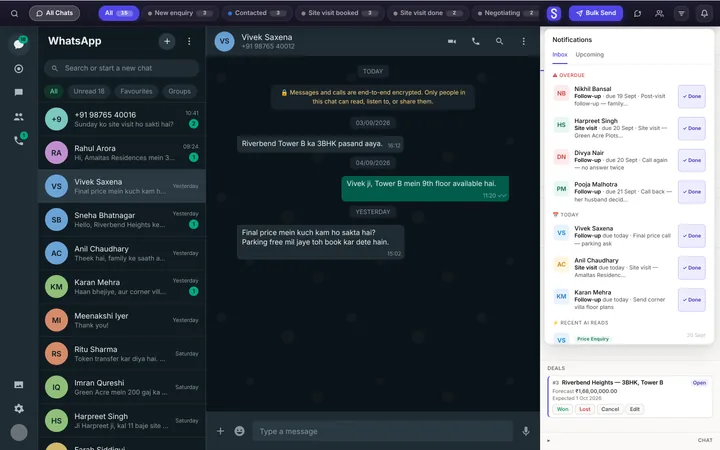
Pick a time: in an hour, tomorrow at 10, in 3 or 7 days, or your own. When it's due, tap it and the lead opens.
- Meetings and visits get a length, and a Done or No-show.
- A clash with another booked time is flagged first.
- Overdue reminders come first in the list.


A reminder chases you, not the customer
Reminders notify your team. Nothing goes to the customer unless you set it up.
- A reminder type can message the customer when booked and before it starts.
Nothing overdue goes unseen
Dashboard home
Overdue follow-ups, on the first screen.
One list
Every reminder across every lead, in Reminders.
Works with
Questions, answered
What is a follow-up reminder app?
It brings each lead back to you at the time you set, so no follow-up depends on memory. Syncdo's reminders sit on the lead, in WhatsApp Web and on your phone.
What reminder types are there?
Follow-up, to-do and meeting to start, plus your own in Settings. Archiving a type keeps the reminders already made.
Do reminders work offline?
On Android, yes: each reminder is also set as an alarm on the phone, so it rings without a connection.
Do reminders show on an iPhone?
Yes. Add the dashboard to your home screen and allow notifications; reminders arrive as push notifications.
Do reminders message my customer?
Only if you set it up: a reminder type can message the customer when it's booked and before it starts.
Can I set a reminder from a call?
Yes. Pick "Call back later" on the after-call card and choose when; the reminder is made for you.
Can I see my team's reminders?
Yes. Reminders lists every reminder across every lead: overdue, today and upcoming.
What happens to reminders when a rep leaves?
Open reminders move with their leads to whoever takes over.
Which plan do I need?
Essentials or Intelligence. Reminders are on both paid plans.
Every follow-up, on time.
Free plan · No card needed · Live the same day